TABLE OF CONTENTS
- Can Eduframe create sections in Canvas courses?
- How can you use Terms in Canvas when Eduframe and Canvas are connected?
- How can I sync grades from Canvas back to Eduframe?
- How does the participant (student) journey look with Eduframe&Canvas?
- More information
Can Eduframe create sections in Canvas courses?
No, in Eduframe there are no sections within a course and therefore can not be synced to Canvas.
Next to that it is possible to use sections in Canvas.
In Canvas there is always one section per course. When Eduframe is creating a course and pushing enrollments to Canvas, this will be in that section (course section). This section have to stay as it is.
If you want to create more sections, see here you possibilities:
- Adding manually extra section(s) in Canvas course.
- Adding extra section(s) via sis import (csv) in Canvas course
How can you use Terms in Canvas when Eduframe and Canvas are connected?
Terms (Canvas functionality) are intended to cluster courses chronologically. Terms can only be defined in Canvas on the root account; manually, via SIS imports or API. Terms are something that can be arranged in Canvas. Eduframe pushes the default/standard term through in Canvas courses.
Eduframe will fill in the course start and end date within a Canvas course and therefor makes use of the course dates.
If you want to use Terms in Canvas, this is possible with the following use case: In Canvas you can filter by terms in all course overviews.
There are options to connect other terms as well:
- Adjust manually in Canvas
- SIS import
- API calls bulk in Canvas

Important:
- The participation within course settings in Canvas, should stay on Course.
- Changing the participation to 'term' will ALWAYS be synced back to 'course'.
How can I sync grades from Canvas back to Eduframe?
You can sync grades back from Canvas to Eduframe with the GradeSync LTI. Read more about it in this article.
How does the participant (student) journey look with Eduframe&Canvas?
An example of a particiapnt journey could be the following example: 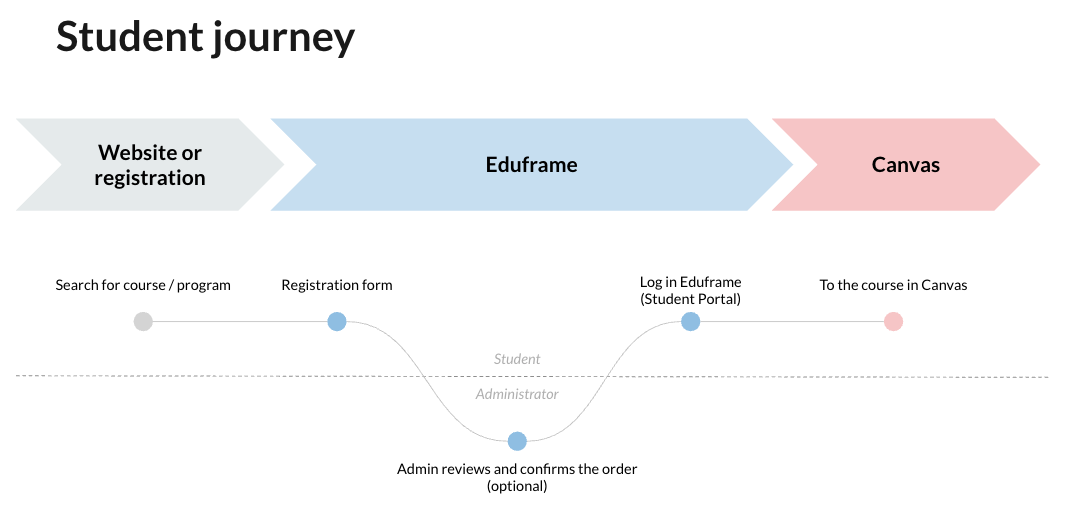
Suggestion: Within Canvas there is no link back to Eduframe. To solve this, you can add Eduframe participant/student portal as a button in the global navigation within Canvas. For this you need knowledge about CSS/Javascript.
For example (back to my courses):

Note: the Canvas setting 'Include this course in the public course index' needs to be disabled for automatic login from Eduframe to Canvas to work. Manual login will always work.
More information

Click here for other Articles around the Settings page in Eduframe

Click here if you have any questions for support.
Was this article helpful?
That’s Great!
Thank you for your feedback
Sorry! We couldn't be helpful
Thank you for your feedback
Feedback sent
We appreciate your effort and will try to fix the article