⚠️ This page is no longer maintained. Please refer to our new Knowledge Base at knowledgebase.portflow.app.
In order to make full use of all Portflow functionalities, Portflow requires the following parameters to be configured in the LMS integration settings.
Canvas
- Sign in as admin and navigate to Admin > [root account].
- Click Developer keys.
- Find the Portflow LTI developer key (recognizable by the plug-icon under the Type column).
- Click the pencil-icon to edit the key.
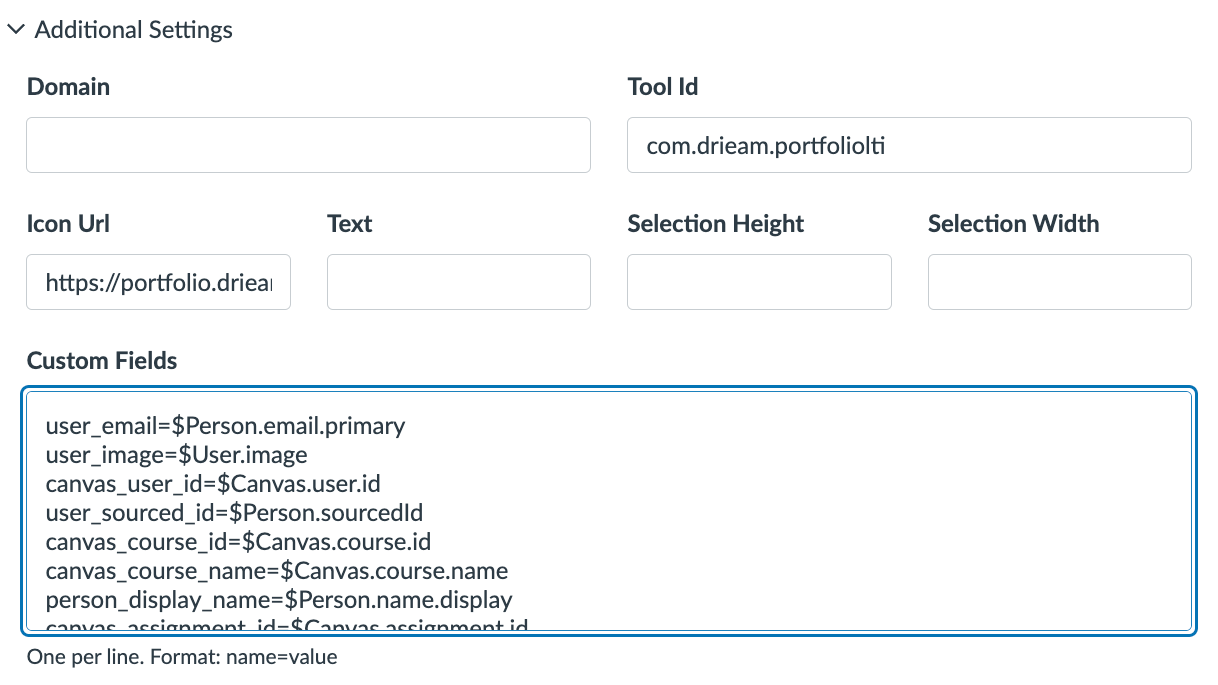
- Expand the Additional Settings section.
- Make sure to have the following Custom fields:
user_email=$Person.email.primary
user_image=$User.image
canvas_user_id=$Canvas.user.id
user_sourced_id=$Person.sourcedId
canvas_course_id=$Canvas.course.id
canvas_course_name=$Canvas.course.name
person_display_name=$Person.name.display
canvas_assignment_id=$Canvas.assignment.id
canvas_assignment_title=$Canvas.assignment.title
canvas_user_is_root_account_admin=$Canvas.user.isRootAccountAdmin
canvas_user_pronouns=$com.instructure.Person.pronouns
The new addition to Canvas as of April 2026 are:

    canvas_user_pronouns=$com.instructure.Person.pronouns
Was this article helpful?
That’s Great!
Thank you for your feedback
Sorry! We couldn't be helpful
Thank you for your feedback
Feedback sent
We appreciate your effort and will try to fix the article