TABLE OF CONTENTS
- Where can I find all teachers?
- How can I create a new teacher?
- How can I delete a teacher?
- How to filter in teachers?
- Related articles
- More information
Teachers
A "teacher" in Eduframe is a contact who has the teacher role and an associated teacher record.
Where can I find all teachers?
Underneath Contacts in the global navigation of Eduframe, you will find four tabs: Contacts, Organizations, Teachers and Duplicate Users.

How can I create a new teacher?
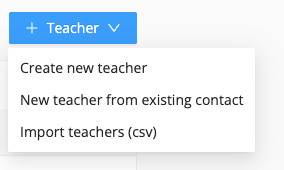
There are three ways to create a new teacher:
1. You can a teacher (contact) from scratch
2. You can make an existing contact a teacher
3. You can do a csv import of teachers
More about creating teachers, click here.
How can I delete a teacher?
You can delete an teacher in Eduframe:
Navigate to Teachers in the global navigation
Click on the teacher.
Click on the Trash icon (next to save).
There will be a pop up that explains what happens when you delete a teacher:
Permanently delete this teacher? This action will delete all data on this page and remove the teacher from all meetings and courses. The contact that is linked to this teacher will not be deleted. You can't undo this action.
Click Delete. (or Cancel)
How to filter in teachers?
There are multiple ways to filter on teachers.
- Labels: If you created labels connected to teachers, you can filter on these in the teacher page. You can find more information on labels here.
- Search: You can search specific teachers by typing part of their names (first and last name), or by typing the answer of a custom field on the Teacher page.
Related articles
- Specify teacher roles in Eduframe
- Set a teacher to an inactive status
- Teacher portal (pending)
- Scheduling
More information

Click here for all Eduframe articles.

Click here if you have any questions for support.
Was this article helpful?
That’s Great!
Thank you for your feedback
Sorry! We couldn't be helpful
Thank you for your feedback
Feedback sent
We appreciate your effort and will try to fix the article